We found no feature for this in this phase.
Create flashcards
Front, back, save - and your digital flashcard is done. Whether it is vocabulary, a technical term, a definition or a formula: written once, edited or deleted at any time.
Images, not just text
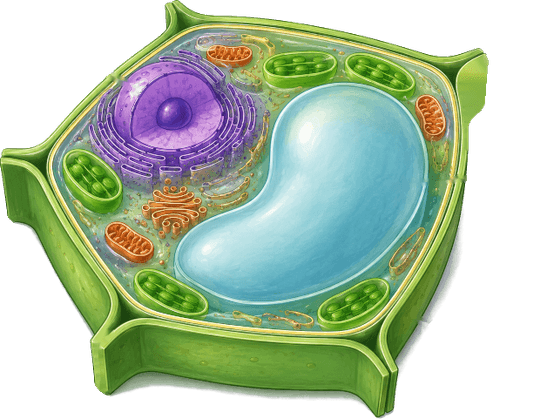
Every side can carry an image - uploaded or taken directly with your phone camera. For illustrations from the textbook, diagrams or the board.
Subjects and topics
The digital schoolbag replaces binders and folders: cards sit in topics, topics in subjects. Topics and single cards without a subject work too.
Learning mode
Choose cards, flip them, assess yourself: knew it or not. As flexible as paper cards - just without the stack of cards in your bag.
Levels and review
Every answer counts: a card's hit rate becomes its level from 1 to 10. Before learning, you choose which levels to work on this time - and practise exactly what has not stuck yet.
Mark cards
A bookmark for the difficult cards. In learning mode you can select only the marked ones - handy just before a test.
Share via link
Send subjects, topics and single cards as a link. Whoever opens it sees the cards in the browser and can try them out - no account needed.
Pins on images
Numbered points right on the image, the solution on the back. Every illustration becomes a labelling task: parts of a cell, countries on a map, components.
Aprendo for institutions
Schools, language schools and other educational institutions get their own area with roles: admin, principal, manager, teacher, student. Accounts are created with a starting password - no email address needed.
Courses, classes, terms
Create terms, classes and courses and add teachers and students. A course without a fixed class works too - for language courses or clubs, for example.
Assign material
Assign a subject or topic to one or more courses with one click. Students find it right away under "Teaching", and whatever you change on the cards reaches them.
Digital class register
Record the lesson topic, attendance and oral participation for each lesson - even afterwards. Absences, excused or not, are visible at a glance for each student.
View learning activity
When and how much did your students practise? Per subject and topic, with right and wrong answers. Only what was learned in the course is counted.
Share material with colleagues
 Biology
Share subjects and topics with the whole institution. Colleagues take their own copy and adapt it for their lessons.
Choice cards
Several answers to choose from, one or more of them correct. Aprendo grades them and shows the solution - multiple choice without you correcting anything.
Input cards
The answer is typed, not just thought. Several fields per card, alternative correct spellings and, if you want, case-sensitive.
Order sentences
Put sentence blocks in the right order, wrong blocks distract. For word order, sentence structure and sequences.
Gap texts
Words in the sentence become gaps, and students fill them with the right blocks - distractors included.
Work instructions
Above an image or choice side, it says what is expected - with the usual task verbs: "Name the marked structures."
Assign from a date
Prepare material and decide from when the course sees it. For the next unit or the week before the test.
Create cards with AI
Upload a worksheet, PDF or photo and say what you need. The AI suggests cards of all types - you check, change and save.
Audio and video
Sound files and videos as a side of their own on a card - for listening comprehension, pronunciation and tasks about a film.
Worksheets with a deadline
Bundle several tasks into one worksheet, give it to the course and set a deadline. You see who has handed it in.
Illustrations from the PDF
The AI cuts illustrations out of your material and turns them into image cards - with pins for labelling.
Learning companion for students
A chatbot that answers and explains questions about the course's cards - matched to what the teacher has assigned.
Content from publishers
Cooperations with educational publishers: textbook content as ready-made cards, ready to assign.
What are you missing?
What comes next is decided partly by the feedback from schools. Tell us what you are missing in your lessons.
Go to contact